You spend hours crafting the perfect resume, hit submit on your dream job, and then… nothing. Total silence. If this sounds familiar, a human probably never even saw your application. You likely got rejected by a robot.
That robot is called an Applicant Tracking System (ATS).
Today, over 90% of large companies use ATS software to scan, sort, and rank resumes before a recruiter ever looks at them. If your resume is not formatted correctly, the system will delete it. Here is how to write a resume that beats the ATS and lands you an interview.
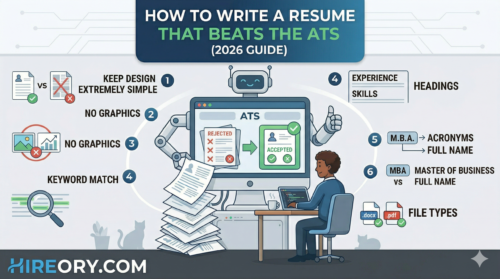
1. Keep the Design Extremely Simple
You might think a colorful resume with custom graphics and charts will make you stand out. To an ATS, those graphics are just invisible errors.
ATS software reads text from top to bottom. It cannot read images, charts, graphs, or complicated columns. Keep your formatting clean and simple. Use standard fonts like Arial, Calibri, or Times New Roman, and rely on standard bullet points to organize your text.
2. Match the Exact Keywords
An ATS ranks your resume based on how well it matches the job description. If the job asks for a “Customer Success Specialist” and your resume says “Client Happiness Manager,” the system might skip you.
- Read the job description carefully.
- Highlight the specific skills and tools the company is asking for.
- Include those exact words naturally in your resume.
3. Use Standard Section Headings
Do not try to be creative with your section titles. The ATS is programmed to look for specific, traditional headings to organize your data.
Instead of writing “My Career Journey” or “Where I Have Worked,” simply use “Work Experience.” Instead of “What I Know,” use “Skills.” Stick to the classics: Education, Work Experience, Skills, and Certifications.
4. Do Not Put Contact Info in the Header
Many people put their name, phone number, and email address in the automated “Header” section of Microsoft Word. This is a big mistake.
Some older Applicant Tracking Systems cannot read information placed in headers or footers. To be safe, place your contact information directly at the very top of the standard document body.
5. Spell Out Acronyms
Robots are not always great at understanding context. If you have an MBA, write out “Master of Business Administration (MBA)” the first time you use it. If you know SEO, write “Search Engine Optimization (SEO).” This ensures that no matter what term the recruiter programmed the ATS to search for, your resume will get a hit.
6. Save as the Right File Type
Always follow the application instructions perfectly. If the job posting asks for a PDF, upload a PDF. If it asks for a Word Document (.docx), use that.
If the listing does not specify, .docx is historically the safest format for older ATS software to read accurately, though most modern systems read .pdf files perfectly fine now.
Final Thoughts
Beating the ATS is not about tricking the system; it is about making your qualifications as clear and easy to read as possible. Keep it clean, use the right keywords, and you will greatly increase your chances of getting your resume into human hands.
Looking for a place to test your new, ATS-friendly resume? Browse the latest daily job updates and hiring opportunities right here on Hireory.com!